Filing Signatures
File certified petition sheets with the state and track your running signature count.
After petition sheets have been certified and scanned, they can be filed with the state. Only certified sheets with a recorded certified signature count (from scanning) can be added to a filing batch. Filing batches group these sheets together and track the running count of filed signatures.
The Filing Tab
Navigate to the Filing tab in the petitioning hub to see all filing batches.
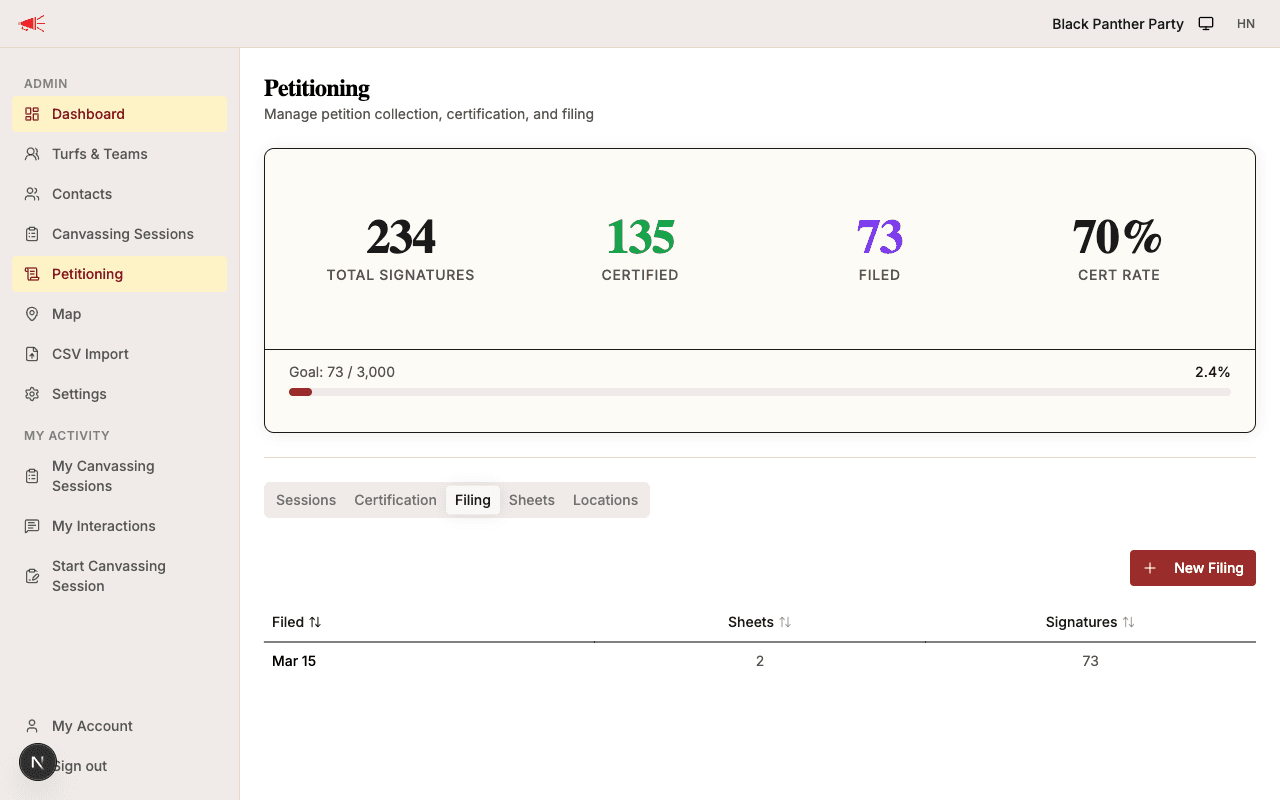
The table shows:
- Filed date — When the batch was submitted to the state.
- Sheets — Number of petition sheets in the batch.
- Signatures — Total signature count from the batch.
Click any column header to sort.
Creating a Filing Batch
- From the filing tab, click New Filing.
- Select which certified sheets to include. Sheets are grouped by city with checkboxes. Use Select All or pick individually.
- Enter the Date filed.
- Add any Notes.
- Click File.
The selected sheets move to Filed status.
Tracking the Running Count
Each filing batch records a running signature count — the cumulative total of signatures filed with the state, as shown on the filing receipt. This number appears in the dashboard stats and drives the progress bar when a signature goal is set.
What's Next
Use the tracking progress page to monitor your overall signature totals, certification rate, and goal progress.